


Information Architecture in UX Design (UX Design IA) structures content so users can find, understand, and use information without friction. Information Architecture (IA) organizes content, labels, navigation, and metadata to support clear user flows across websites, applications, and services in both online and real world environments.
Information Architecture (IA) works by aligning three variables: Users, Content, and Context. This model, described in Information Architecture for the World Wide Web by Louis Rosenfeld, Peter Morville, and Jorge Arango, defines an information ecology where structure supports meaning. In UX design, IA determines how Website Navigation, hierarchies, and search functionality operate inside a product.
There are 6 core benefits of Information Architecture UX:
-
Improves findability and accessibility
-
Reduces cognitive load
-
Increases task completion rates
-
Strengthens Content Strategy
-
Supports scalable design systems
-
Aligns business goals with user needs
UX Information Architecture applies to 4 main environments: websites, mobile applications, enterprise platforms, and service ecosystems. A UX designer uses IA methods such as card sorting, tree testing, taxonomy design, and wireframing to define site maps, metadata schema, and navigation systems.
The main parts of IA in UX include:
-
Organization systems
-
Labeling systems
-
Navigation systems
-
Search systems
-
Content hierarchies
-
Metadata structures
Information Architecture (IA) forms the structural layer of User Experience (UX) Design and directly influences User Interface (UI) Design decisions.
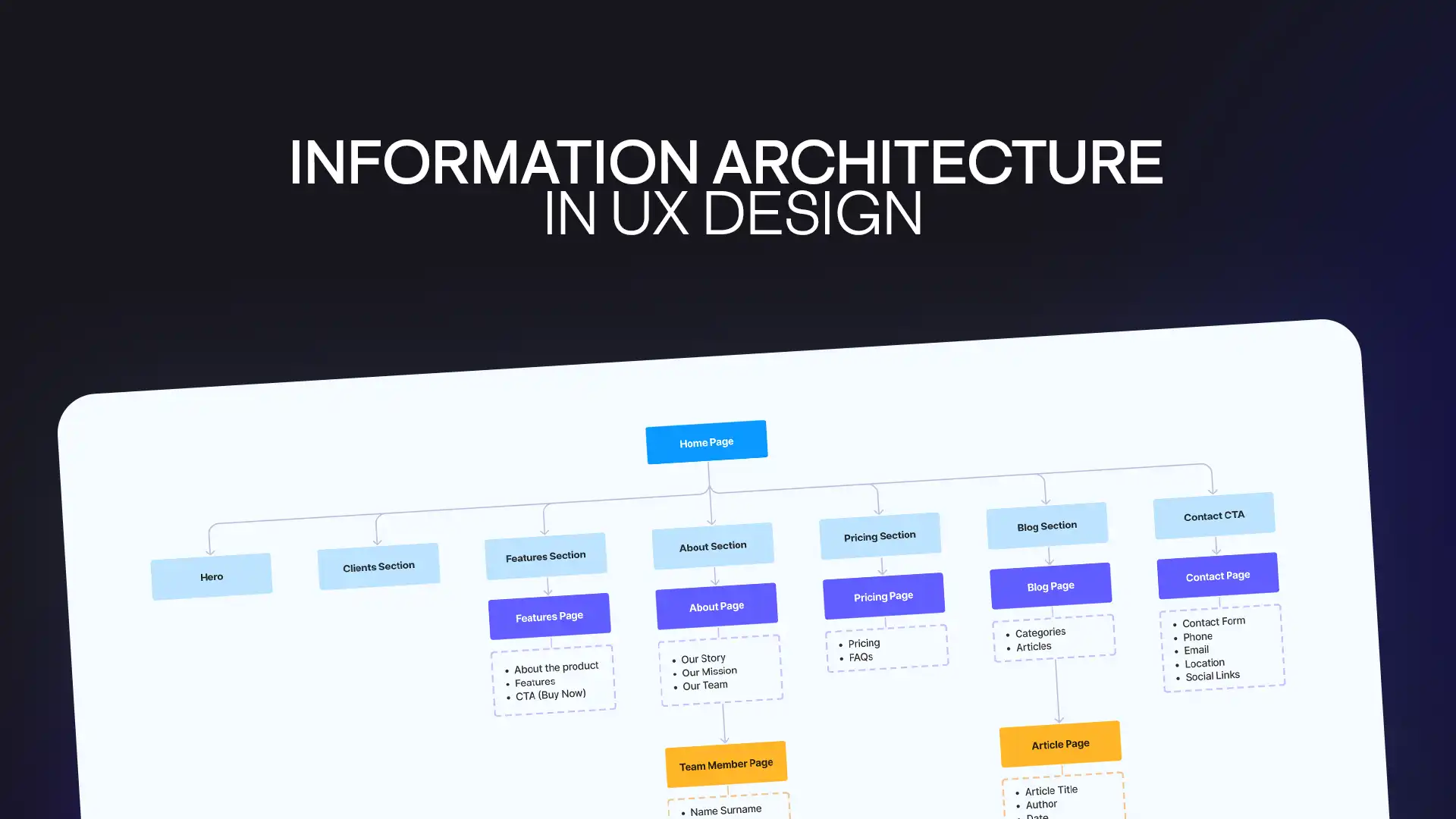
What is Information Architecture (IA)?
Information Architecture (IA) is the discipline of organizing, structuring, and labeling information so users can search, browse, and understand content efficiently. IA supports searching, browsing, categorizing, and presenting information in relevant and contextual ways.
IA exists in physical and digital spaces. Museums, department stores, websites, and applications all use structured categorization systems. In a natural history museum, fossils from the Jurassic period appear in structured collections. In a supermarket, products follow aisle-based taxonomy. The same logic applies to digital interfaces.
In digital products, IA defines:
-
Information hierarchy
-
Taxonomy design
-
Metadata schema
-
Navigation structure
-
Content relationships
IA translates language into structure. Labels, menus, filters, and categories guide the User through a product.
The discipline gained recognition through the work of Louis Rosenfeld, Peter Morville, and Jorge Arango in Information Architecture for the World Wide Web. Their concept of information ecology describes the relationship between Users, Content, and Context. The Venn diagram representing these relationships shows interdependency rather than isolation.
Context includes business goals, funding, culture, technology, and politics. Content includes data types, volume, and structure. Users include tasks, behaviors, and expectations.
IA and UX Design
IA and UX design are interconnected because IA defines structure while UX defines experience. IA in UX determines how information flows before visual styling begins.
A UX designer begins with user research. Research clarifies user needs, motivations, and search behaviors. Once patterns are identified, the UX designer builds:
-
Site maps
-
Wireframes
-
Content hierarchies
-
User flows
-
Navigation systems
Visual Paradigm and similar tools support sitemap modeling under Fair Use for educational visualization. These artifacts shape Interaction Design decisions.
Information Architecture (IA) provides the foundation for:
-
Website Navigation
-
User flows
-
Content Strategy
-
Design systems
Without IA, UX design lacks structure.
Why is Information Architecture Important in UX Design?
Information Architecture improves usability, findability, and task efficiency inside digital products.
There are 5 measurable impacts of Effective Information Architecture:
-
Decreases navigation errors
-
Reduces bounce rate
-
Improves search accuracy
-
Increases conversion rate
-
Supports product scalability
IA aligns user needs with business goals. It ensures the organization of information reflects how users think, not how internal teams structure departments.
UX Information Architecture also strengthens accessibility by supporting predictable navigation systems and consistent metadata.
Information Architecture Principles
Information Architecture Principles define how IA systems operate at scale.
The Principle of Objects
Content behaves like modular objects with attributes and lifecycle states. Each content object contains metadata and relationships.
The Principle of Choices
Navigation should present meaningful options. Limiting unnecessary choices improves decision speed.
The Principle of Disclosure
Show only necessary information at first. Reveal deeper layers progressively to reduce overload.
The Principle of Exemplars
Use examples inside categories to clarify meaning. Examples strengthen taxonomy comprehension.
The Principle of Front Doors
Users enter through multiple entry points, not only the homepage. Search engines, deep links, and shared URLs function as front doors.
The Principle of Multiple Classification
Users classify information differently. Provide multiple paths through faceted navigation and filtering systems.
The Principle of Navigation
Navigation systems must remain consistent across pages. Predictable structure improves user flows.
The Principle of Growth
Information systems expand. IA Design Process must support scalability in content volume and feature development.
Who’s Responsible for Information Architecture and What Does the Process Look Like?
A UX designer, content strategist, and product team share responsibility for Information Architecture.
The IA Design Process includes 8 structured steps:
-
Conduct user research
-
Perform content audit
-
Define taxonomy
-
Create site maps
-
Develop wireframes
-
Test with tree testing
-
Validate through usability testing
-
Refine metadata schema
AI-assisted research supports IA audits and content clustering. AI accelerates pattern detection in large content inventories, but human validation remains necessary.
IA integrates into User Experience (UX) Design workflows from early concept stages.
Information Architecture Design for Mobile
Mobile environments require compact hierarchies and clear interaction flows.
Consider Click Investment
Reduce taps required to complete tasks. High click investment decreases retention.
Keep it Simple Stupid (KISS)
Simplify navigation layers. Limit nested hierarchies.
Think About Input Devices
Mobile devices use touch input. Button size, spacing, and gesture interactions influence IA structure.
Provide Clear Navigational Cues
Use visual hierarchy, labeling clarity, and contextual breadcrumbs to support orientation.
The Heart of the Matter, Information Architecture in the Mobile Age
Information Architecture in the Mobile Age prioritizes speed, clarity, and structured navigation.
Mobile users rely on search functionality and scanning behavior. IA must support short attention spans and fragmented sessions.
Website Information Architecture now integrates with applications, voice interfaces, and AI-driven assistants. Structured metadata supports AI-based searching and recommendation systems.
Flow Design Processes - Focusing on the Users' Needs
Flow Design Processes map user flows from entry to completion.
UX Information Architecture strengthens flow design by:
-
Mapping task sequences
-
Aligning navigation structure
-
Reducing friction points
-
Supporting predictable outcomes
User-centered design ensures IA decisions match user expectations rather than internal organizational charts.
How to Prevent Negative Emotions in the User Experience of Your Product
Prevent negative emotions by improving Information Architecture clarity and predictability.
There are 4 common emotional triggers in poor IA:
-
Confusion from unclear labels
-
Frustration from hidden content
-
Anxiety from unpredictable navigation
-
Cognitive overload from deep hierarchies
Improve Information Architecture by simplifying categories, clarifying metadata, and validating structure through usability testing.
The Take Away
Information Architecture (IA) structures content for clarity, usability, and scalability. IA in UX strengthens Website Navigation, Content Strategy, and User Experience IA performance metrics.
Effective Information Architecture aligns Users, Content, and Context through structured taxonomy, metadata, and navigation systems. IA Design Process includes research, modeling, testing, and refinement.
Final Thoughts
Information Architecture remains foundational in UX design. IA shapes how Users search, browse, and interact with digital products across devices and channels. UX Design IA integrates structure with Interaction Design to support clarity and performance.